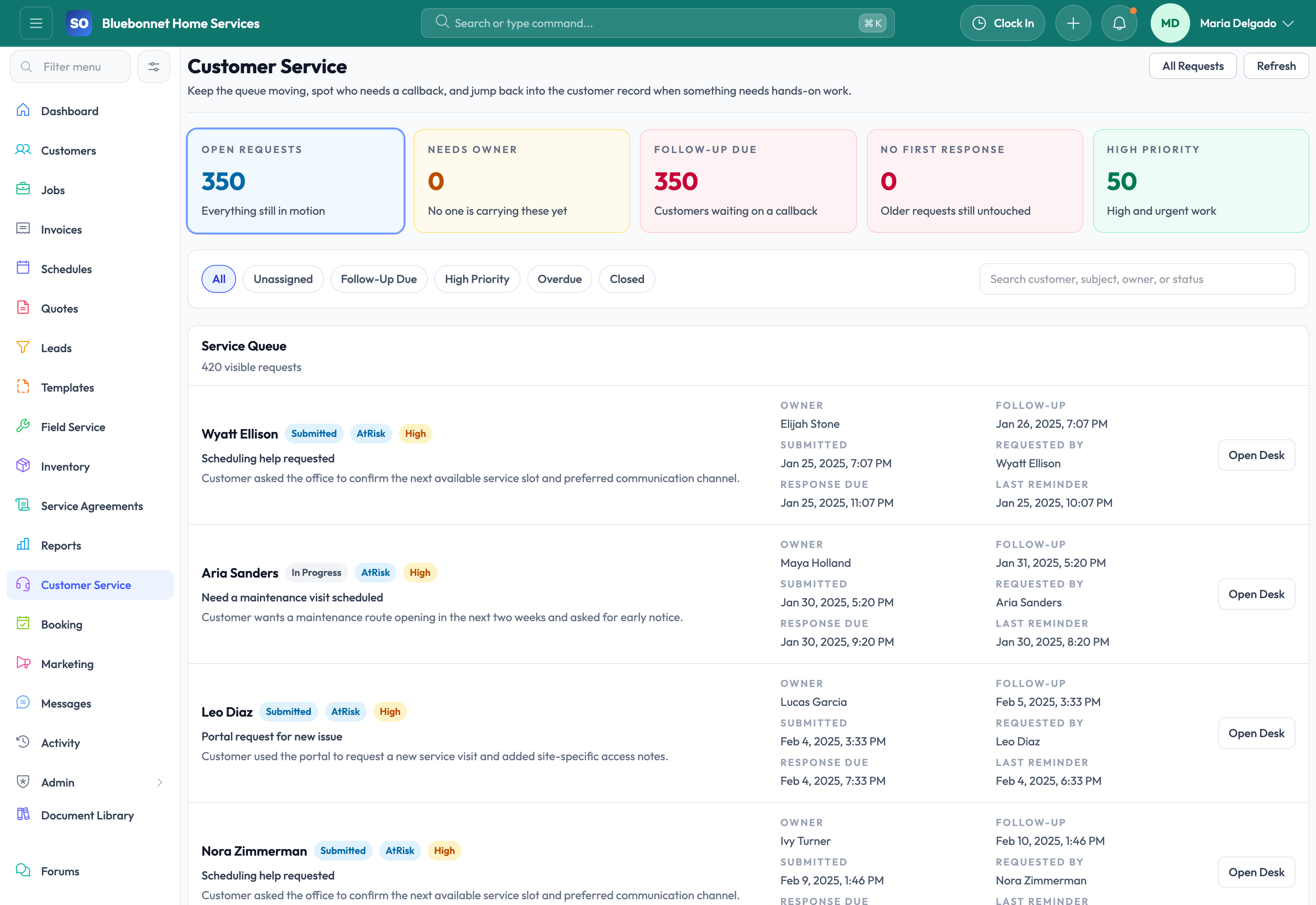
Capture service requests cleanly, keep account context attached, and route each request toward the right next action.
See it in action
In many service businesses, customer service work is where operational chaos begins. A customer calls with a problem, someone writes down partial details, the request sits in an inbox, and the office later has to guess whether it should become a booking, a new lead, or a follow-up on existing work. Service Opus gives customer service teams a structured intake workflow so requests stay visible and connected to the account they belong to.
Business Needs It Solves
No dropped requests: Every inbound issue or service inquiry should land in a visible queue instead of depending on sticky notes or memory.
Cleaner triage: Office staff need to distinguish between support issues, new sales opportunities, booking requests, and job-related follow-up.
Full customer context: The person taking the request should be able to see the customer, site, contacts, and previous service history immediately.
Reliable handoff: Once intake is complete, the request should move into the correct operational workflow without re-entry.
How Service Opus Helps
Structured request intake: Capture subject, description, priority, preferred contact method, and requested service date in a consistent format.
Customer-linked request history: Tie requests back to customers, sites, and contacts so the team understands the account before responding.
Portal submissions: Customers can submit service requests through secure portal experiences, preserving context and reducing back-office rekeying.
Workflow routing: Requests can be advanced toward lead, booking, or job workflows depending on what the office determines is needed next.
Status visibility: Teams can keep track of whether a request is new, under review, routed onward, or already addressed.
What This Means for the Front Office
Customer service becomes easier to scale when intake is consistent. New CSRs can follow the same process, managers can see outstanding requests, and customers get faster, more informed responses because the office is working from the full account record instead of disconnected notes.
Best fit: This module works especially well alongside Customers, Booking & Portal, and Job Management when your office handles a mix of inbound service work, reschedules, and support follow-up.
User Guide
Route customer requests into the right operational path while keeping context visible.
Best For
Customer service representatives handling calls, emails, and portal requests.
Dispatchers triaging urgent service issues.
Managers monitoring response quality and unresolved requests.
Before You Start
Define service request categories, priority levels, and escalation rules.
Confirm which requests should become leads, jobs, booking requests, or internal tasks.
Prepare response templates for common situations.
Recommended Workflow
Open or create the customer record and confirm the caller, location, and service need.
Log the request with category, priority, description, attachments, and preferred response channel.
Assign ownership and set the next action deadline.
Route urgent work to dispatch or job creation.
Close the request only after the next operational record or customer response is complete.
Review Checklist
Every open request has an owner and priority.
Customer promises are recorded in the request history.
Urgent requests are visible to dispatch before schedule decisions are locked.
Closed requests include a clear resolution.
Common Handoffs
Customers for account and location history.
Booking and Portal for inbound customer self-service.
Jobs for dispatchable service work.
Communications for message history.
Ready to apply this workflow?
Use the guide to evaluate fit, then start a trial or talk through how Service Opus maps to your team, trade, and current operating process.