Keep photos, files, signatures, templates, and shared proof attached to the records they belong to instead of scattered across devices and inboxes.
See it in action
Document management in a service business is rarely just about storage. Teams need job photos, signed approvals, contracts, reports, compliance files, and customer-facing media to stay connected to the correct job, customer, or employee. Service Opus makes documents part of the operational record so the office and field team are working from the same evidence.
Business Needs It Solves
Centralized job and customer proof: Photos, attachments, and signed files need to stay with the work they support.
Faster retrieval: Staff should be able to find the right file by record, type, tag, or date without digging through shared folders.
Better customer handoff: Shared galleries, signed documents, and portal-ready files need a secure way to be reviewed outside the office.
Compliance and expiration visibility: Important documents should surface before they expire or go missing at the wrong moment.
How Service Opus Helps
Record-linked uploads: Attach documents to jobs, leads, customers, employees, and other records so files stay in business context.
Job media workflows: Capture photos, previews, annotations, signatures, and shared galleries directly from the job experience.
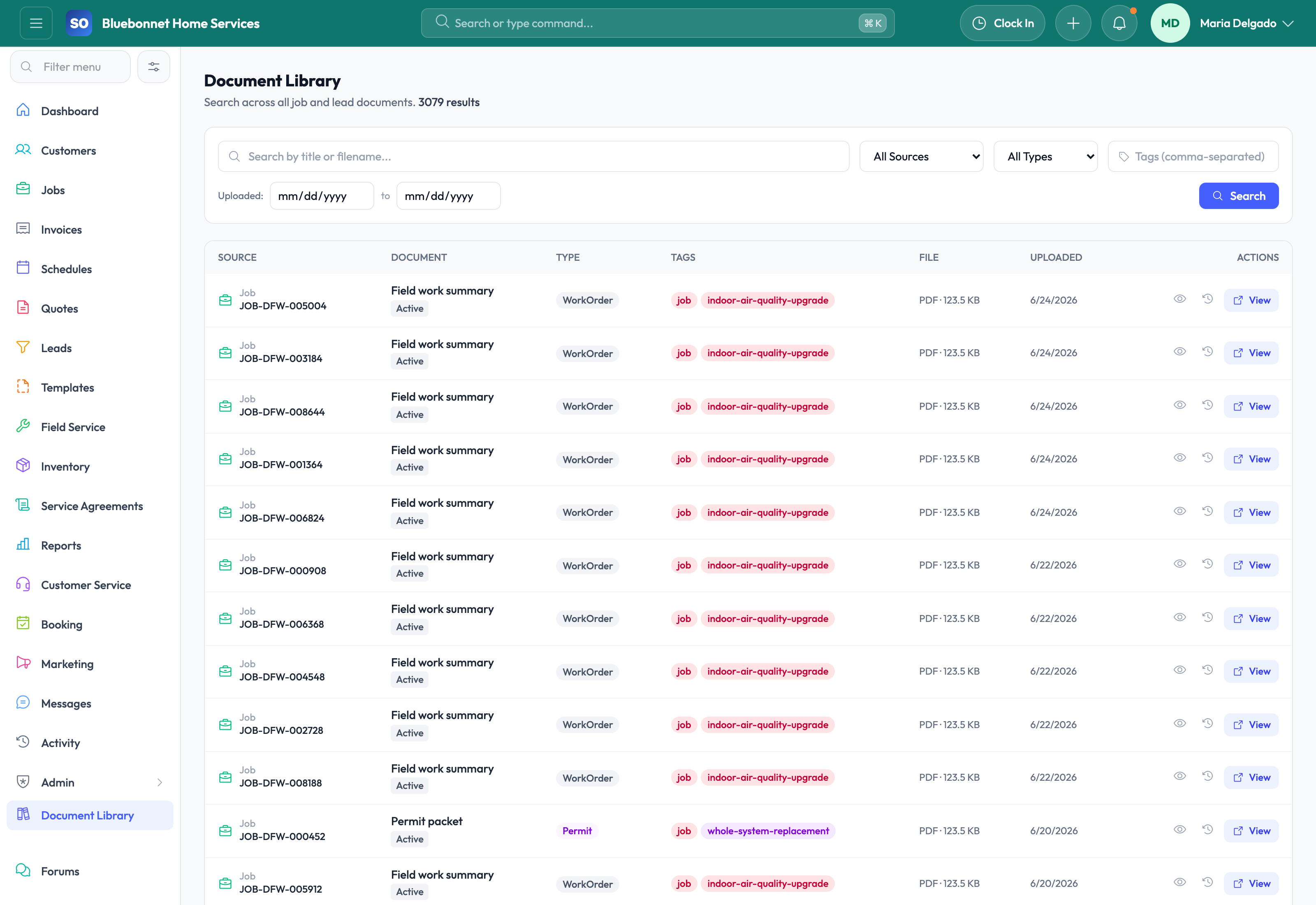
Cross-entity document library: Search and filter files across the system by title, tags, source type, date range, and document category.
Preview and annotation tools: Open images, PDFs, and supported files in preview, then annotate images without leaving the workflow.
Document templates: Build reusable document templates with merge fields and render customer-ready files from live data.
E-signature support: Capture signatures with signer details and store them as part of the job or document history.
Expiration and compliance visibility: Use document expiration data alongside compliance dashboards so expiring items do not stay hidden.
What Better Document Control Delivers
When documents are tied to the operational record, closeout is cleaner, disputes are easier to resolve, and teams spend less time asking who has the latest file. Service Opus is especially helpful for photo-heavy work, inspection-heavy work, and businesses that need better proof of service for customers or compliance reviews.
Best practice: Attach files to the most specific record available, such as the job, site, employee, or compliance item, so they stay easier to find later.
User Guide
Keep files, photos, forms, signatures, and reusable documents attached to the records they support.
Best For
Office teams organizing customer, job, quote, invoice, and employee files.
Technicians capturing field proof and completion photos.
Managers reviewing documentation for compliance, billing, and disputes.
Before You Start
Define document categories, naming conventions, retention expectations, and visibility rules.
Prepare reusable document templates where the same forms are used repeatedly.
Clarify which attachments belong on customers, jobs, invoices, employees, or agreements.
Recommended Workflow
Upload or capture documents from the relevant record whenever possible.
Add category, description, and related entity context.
Use templates for recurring forms, letters, certificates, or closeout packets.
Review photos, signatures, and attachments before billing, warranty, or compliance action.
Remove or replace outdated files according to company policy.
Review Checklist
Files are attached to the correct customer, job, invoice, or employee.
Document names and categories make search useful.
Customer-visible files are reviewed before sharing.
Required proof is present before job closeout or invoice delivery.
Common Handoffs
Jobs and Field Service for photos and proof of work.
Customers for account documents.
Templates for reusable document generation.
Compliance for required certificates and records.
Ready to apply this workflow?
Use the guide to evaluate fit, then start a trial or talk through how Service Opus maps to your team, trade, and current operating process.