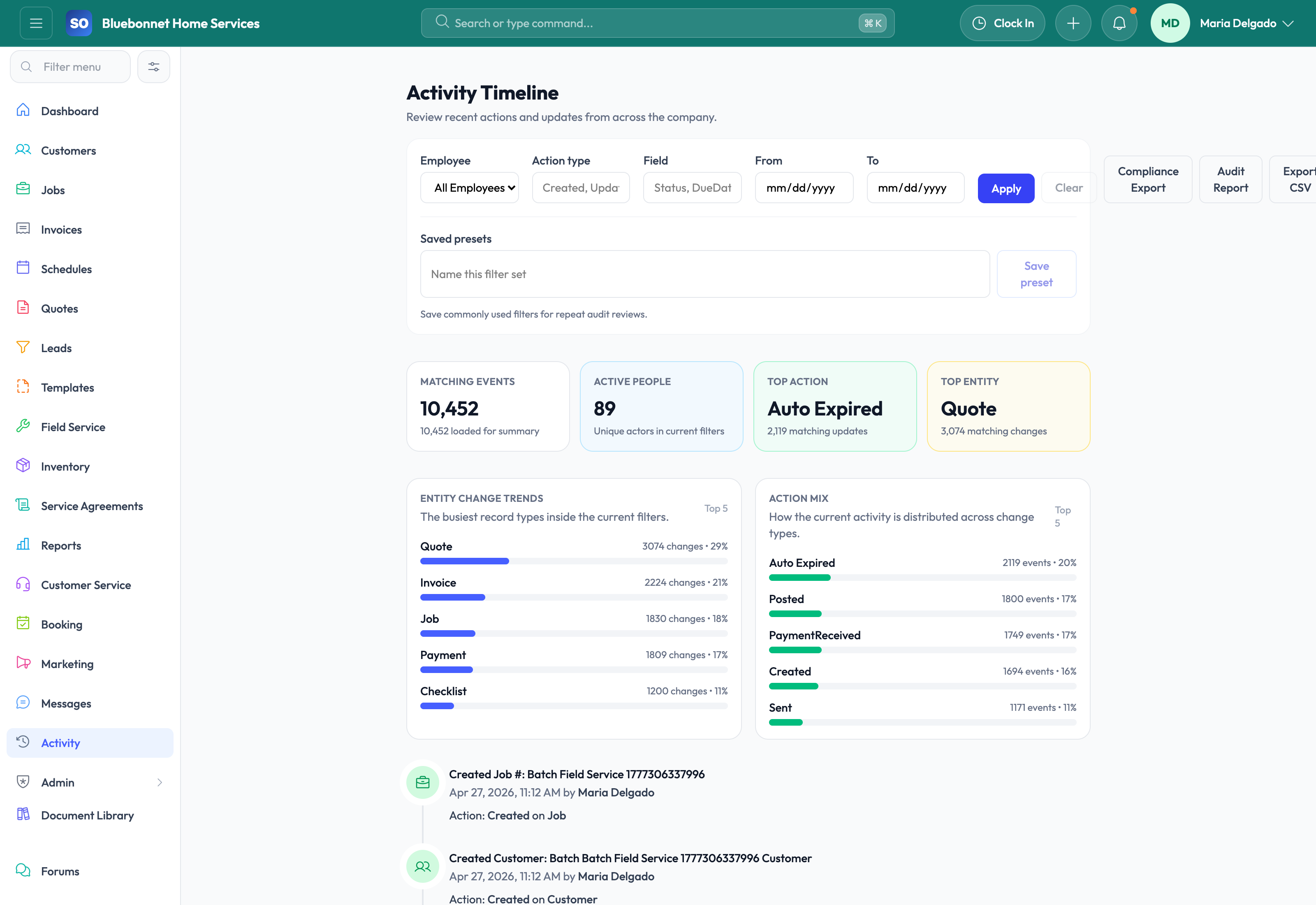
See what changed, who changed it, and when it happened so operational accountability does not depend on memory.
See it in action
As teams grow, problems become harder to untangle without reliable history. A quote was changed, an invoice was voided, a setting moved, a job status shifted, or a document disappeared, and now no one is certain how it happened. Service Opus keeps a centralized activity trail so important actions are easier to review after the fact, with especially strong audit visibility around employee changes and key operational records.
Business Needs It Solves
Change accountability: Managers need to know who performed important actions across CRM, jobs, schedules, media, settings, and financial workflows.
Dispute resolution: Teams need a timeline when customers, office staff, or technicians disagree about what happened.
Safer operations: Sensitive changes around approvals, collections, settings, and uploads should be reviewable later.
Compliance and HR support: Certain records, especially employee changes, need stronger audit visibility for internal review.
How Service Opus Helps
Centralized activity timeline: Review user activity and important events across the system from one history service.
Entity-level history: Many records can surface their own activity stream so teams can investigate changes in context instead of piecing events together manually.
Operational event coverage: Creates, updates, deletes, uploads, approvals, workflow actions, and status changes can all contribute to the history record.
Employee audit visibility: Employee-specific field-level audit history is available separately for stronger HR accountability.
Cross-company scoping: History remains partitioned correctly so teams only see the activity that belongs to their company context.
Where Audit History Adds the Most Value
History is especially useful when reviewing settings changes, quote approvals, invoice or payment activity, customer-facing updates, and employee record changes. Coverage is broad across operational workflows, and the dedicated employee audit trail adds deeper field-level accountability where HR review matters most.
Tip: Use history whenever a business-critical record changed unexpectedly or when you need to reconstruct a handoff that did not go as planned.
User Guide
Review who changed what, when it happened, and which operational records were affected.
Best For
Admins investigating configuration or data changes.
Managers reviewing financial, customer, or job activity.
Support and operations teams troubleshooting unexpected outcomes.
Before You Start
Identify which records and actions need audit review for your operating model.
Limit access to sensitive history according to role.
Define escalation steps for financial, permission, or customer-impacting changes.
Recommended Workflow
Open the activity or audit timeline for the relevant area.
Filter by record, user, date, action type, or module.
Compare the changed value with the current customer, job, invoice, or settings record.
Document findings when the change affects billing, customer commitments, or compliance.
Use results to correct data, update process, or adjust permissions.
Review Checklist
Audit findings are checked against source records before action.
Sensitive changes are reviewed by an appropriate manager.
Recurring mistakes lead to training or workflow updates.
History access is not broader than necessary.
Common Handoffs
Settings and Config for setup changes.
Invoicing and Payments for financial history.
Jobs and Customers for operational history.
Compliance for incident and document review.
Ready to apply this workflow?
Use the guide to evaluate fit, then start a trial or talk through how Service Opus maps to your team, trade, and current operating process.