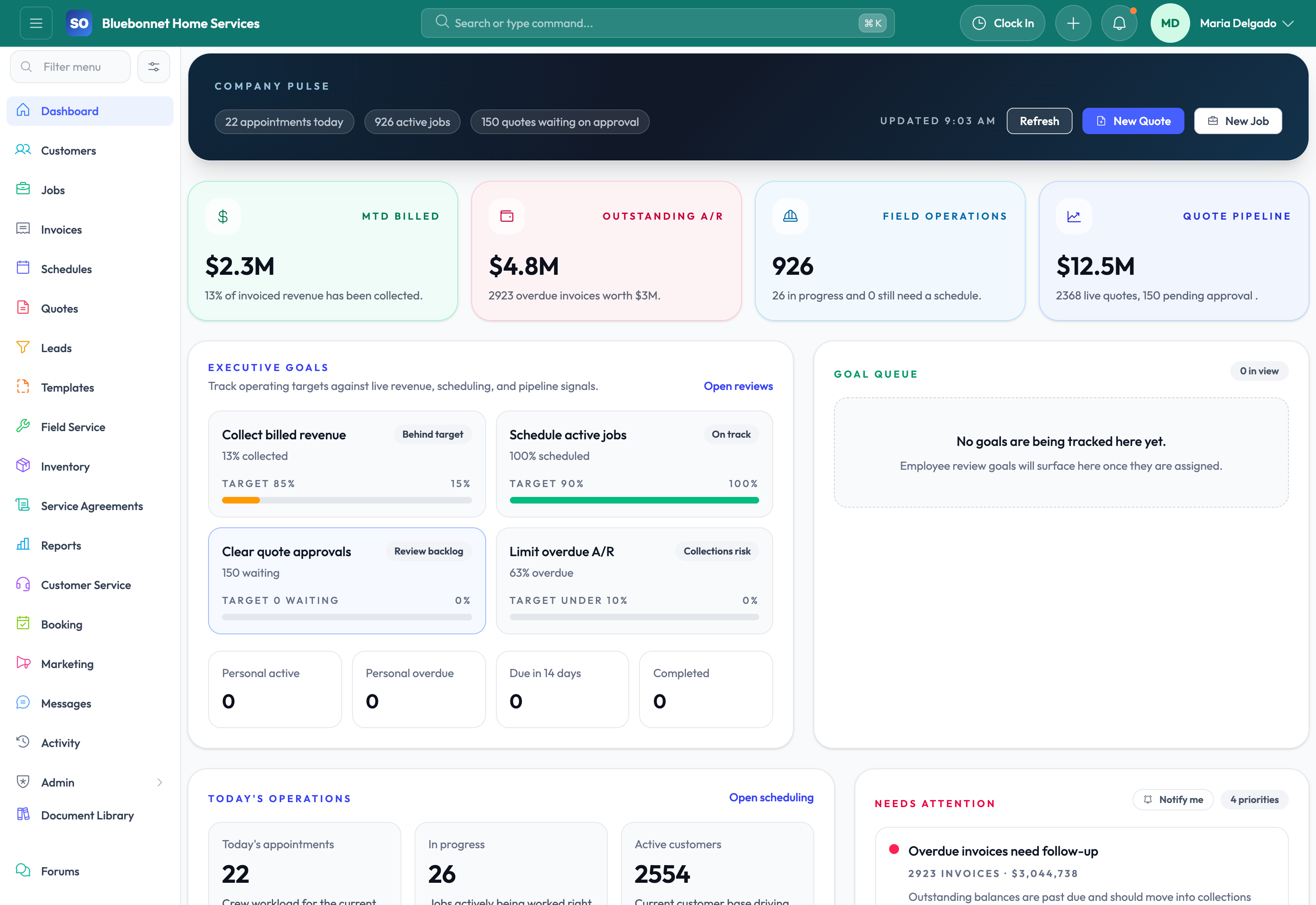
Know what deserves attention before the day gets away from your office, dispatch, and field team.
See it in action
For most trades businesses, the problem is not a lack of information. It is that the important signals are scattered across calls, calendars, job boards, invoices, and team chats. The Service Opus dashboard gives owners, dispatchers, and office managers a fast operational picture so they can decide what needs action first without digging through multiple modules.
Business Needs It Solves
Morning control: See today's workload, open priorities, and recent changes before phones start ringing and crews roll out.
Faster triage: Identify which jobs, invoices, leads, or customer issues need intervention right now instead of discovering them later in the day.
Shared visibility: Give owners, dispatch, service managers, and office staff a consistent picture of what is happening across the business.
Reduced context switching: Use one page to jump into the right workflow rather than opening several modules just to understand priorities.
How Service Opus Helps
Overview metrics: The dashboard surfaces core counts such as customers, active jobs, open invoices, and pending leads so the health of the business is visible at a glance.
Today's schedule visibility: Dispatch can immediately review what is booked today and where schedule pressure may be building.
Recent jobs and follow-up queues: Office staff can spot recently updated work, incomplete handoffs, or jobs that need attention without running a report.
Quick navigation: The dashboard acts as an operational launch point into scheduling, jobs, leads, invoices, and related deeper workflows.
Connected analytics: The broader platform adds schedule analytics, lead analytics, employee performance, inventory reporting, and compliance summaries so the dashboard is backed by real operational depth.
Who Gets the Most Value
Owners use the dashboard to understand workload and revenue risk. Dispatch uses it to manage the day. Office managers use it to stay ahead of callbacks, invoice follow-up, and service bottlenecks. It is especially useful for growing service companies that have outgrown a whiteboard or need better visibility than a job list alone can provide.
Best use: Make the dashboard part of your morning dispatch rhythm. Review schedule pressure, open jobs, pending leads, and receivables first, then hand work off into Scheduling & Dispatch, Job Management, or Invoicing & Payments as needed.
User Guide
Use the dashboard as the daily command center for triage, routing, and follow-up.
Best For
Owners reviewing workload, revenue pressure, and operational risk.
Dispatchers starting the day with schedule and job exceptions.
Office managers watching leads, invoices, and customer follow-up.
Before You Start
Confirm each team member has access to the widgets and modules they manage.
Define what counts as urgent for leads, jobs, invoices, and callbacks.
Review dashboard data early enough for schedule changes to matter.
Recommended Workflow
Scan top metrics for workload, customer demand, open jobs, and receivables.
Open today's schedule and identify jobs that need assignment, confirmation, or route review.
Review recent job and lead activity for stalled handoffs.
Open receivable or invoice queues that need collection action.
Assign follow-up owners before the morning dispatch rhythm ends.
Review Checklist
Unassigned or overdue work has a named owner.
High-priority appointments have technician assignments and customer context.
Cash-flow exceptions have a next action.
Dashboard signals are reviewed against live module records before major decisions.
Common Handoffs
Scheduling and Dispatch for appointment corrections.
Jobs for operational follow-through.
Invoicing and Payments for cash-flow cleanup.
Reporting and Analytics for deeper trend review.
Ready to apply this workflow?
Use the guide to evaluate fit, then start a trial or talk through how Service Opus maps to your team, trade, and current operating process.